Why Does Neck Pain Increase After Working on a Laptop? Common Causes and Prevention Tips
Medically reviewed by Dr. Abhinav Srivastava, Orthopaedic Surgeon, MBBS, MS
Last reviewed: 9 Aug 2026
Introduction
Many people spend several hours each day working on laptops for office work, online classes, meetings, gaming, or entertainment. While laptops offer convenience and portability, prolonged use can place significant stress on the neck and upper back.
Neck pain that develops or worsens after working on a laptop is often related to posture, screen position, and muscle strain. If ignored, the discomfort may gradually become a recurring problem that affects daily activities and productivity.
Understanding why laptop use can trigger neck pain is the first step toward preventing long-term problems.
Why Does Laptop Use Affect the Neck?
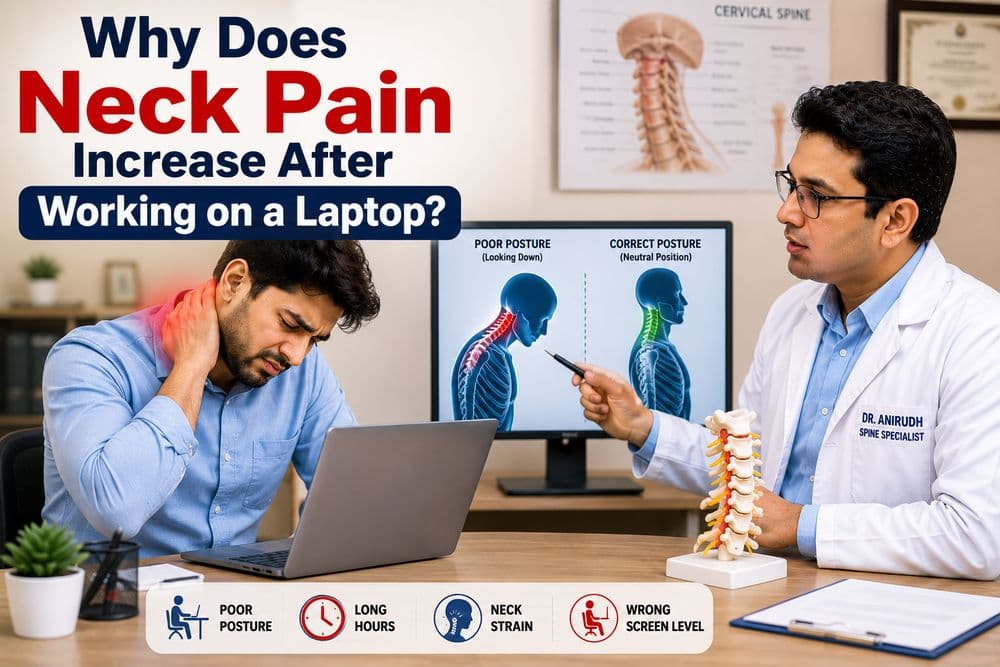
Unlike desktop computers, laptops often encourage users to look downward at the screen.
This position may cause:
- Forward head posture
- Rounded shoulders
- Increased neck strain
- Upper back tension
The neck muscles must work harder to support the head when it is tilted forward for long periods.
Common Causes of Neck Pain After Laptop Use
1. Poor Posture
Poor posture is one of the leading causes of laptop-related neck pain.
Common mistakes include:
- Slouching while sitting
- Leaning toward the screen
- Looking down continuously
- Hunching the shoulders
These habits increase stress on the neck and upper spine.
2. Forward Head Position
When the head moves forward from its natural position, additional pressure is placed on the cervical spine.
The farther the head moves forward, the greater the strain on:
- Neck muscles
- Ligaments
- Joints
- Cervical discs
3. Long Hours Without Breaks
Working continuously for several hours without changing position may cause:
- Muscle fatigue
- Neck stiffness
- Reduced flexibility
- Increased discomfort
4. Incorrect Screen Height
Laptop screens are usually positioned lower than eye level.
This forces users to bend their neck downward repeatedly, increasing strain on the cervical region.
5. Lack of Ergonomic Support
Poor workstation setup may contribute to:
- Neck pain
- Shoulder tightness
- Upper back discomfort
Examples include:
- Unsupportive chairs
- Improper desk height
- Poor screen placement
6. Tech Neck Syndrome
Frequent laptop and mobile phone use can contribute to a posture-related condition known as Tech Neck Syndrome.
Symptoms may include:
- Neck pain
- Shoulder stiffness
- Headaches
- Reduced neck mobility
Symptoms Associated With Laptop-Related Neck Pain
Common symptoms include:
Neck Stiffness
Difficulty turning the neck comfortably.
Shoulder Tightness
Pain or tension around the shoulders.
Upper Back Pain
Discomfort between the shoulder blades.
Headaches
Muscle tension may trigger headaches.
Reduced Neck Movement
Pain may limit normal neck motion.
Tingling Sensation
In some cases, nerve irritation may cause tingling in the arms or hands.
Who Is Most at Risk?
Laptop-related neck pain is commonly seen in:
- Office workers
- Students
- Software professionals
- Remote workers
- Gamers
- Content creators
Anyone spending long hours in front of a screen may be affected.
How Can You Prevent Neck Pain While Using a Laptop?
Raise the Screen Height
Position the screen closer to eye level whenever possible.
A laptop stand may help improve posture.
Maintain Good Sitting Posture
Keep:
- Back supported
- Shoulders relaxed
- Head aligned with the spine
Take Regular Breaks
Stand up, stretch, and move every 30–60 minutes.
Perform Neck Stretching Exercises
Gentle stretching may help reduce stiffness and improve flexibility.
Use an External Keyboard and Mouse
This allows the screen to be positioned higher without affecting hand placement.
Strengthen Neck and Upper Back Muscles
Regular exercise may improve posture and reduce strain.
When Should You See a Doctor?
Medical evaluation may be recommended if:
- Pain lasts for several weeks
- Symptoms become severe
- Tingling develops in the arms
- Weakness occurs
- Daily activities become difficult
Persistent symptoms may indicate an underlying cervical spine condition.
Can Laptop Use Cause Long-Term Neck Problems?
Prolonged poor posture may contribute to:
- Chronic neck pain
- Muscle imbalance
- Postural abnormalities
- Cervical spondylosis
- Reduced spinal flexibility
Early posture correction may help reduce long-term risks.
Conclusion
Neck pain after working on a laptop is often caused by poor posture, forward head positioning, prolonged sitting, and inadequate workstation ergonomics. While occasional discomfort may improve with rest, recurring symptoms should not be ignored.
Simple adjustments such as improving posture, taking regular breaks, and maintaining proper screen height can significantly reduce neck strain and support long-term spinal health.
Related reading
Top Spine Surgeon doctors in Lucknow on Zospital
Verified specialists you can book in minutes.
- Book appointment
Pegasus Spine & Joint Institute - Dallas
Spine And Pain Specialist
Alappuzha
4.8 - Book appointment
Tarpon Interventional Pain & Spine Care
Spine And Pain Specialist
Alappuzha
4.8 - Book appointment
Dr Bama Spine Care
Spine And Pain Specialist
Alappuzha
4.9 - Book appointment
Dr. Nigil Sadanandan Spine surgeon
Spine Surgeon
Alappuzha
5 - Book appointment

Pain and Spine Physicians | Chronic Pain | Frisco
Spine And Pain Specialist
Aizawl
4.4 - Book appointment
Rajesh Arakal, MD
Spine Surgeon
Aizawl
4.9
Have More Questions?
Find quick answers to common questions about our services, appointments, and patient care.
Laptop use often encourages poor posture and forward head positioning, which can strain neck muscles and joints.
Yes. Long-term poor posture may contribute to persistent neck discomfort.
Tech Neck Syndrome is a posture-related condition caused by prolonged use of digital devices.
Maintaining proper posture, raising screen height, and taking regular breaks may help.
Occasional pain is usually temporary, but persistent symptoms should be evaluated by a healthcare professional.
Yes. Muscle tension in the neck and shoulders may contribute to headaches.

Private hospitals in Lucknow on Zospital
Prefer a private option? These hospitals in Lucknow list their doctors and take bookings.
- Paarth Eye Hospital & Retina Centre
- Urmila Devi Memorial Hospital- Child Specialist Hospital in Lucknow | Pediatrician hospital
- SPARSH CHILDREN'S HOSPITAL & VACCINATION CENTER | Child Hospital in Raebareli Road Lucknow | Dr. Akhilesh Pandey |
Related Articles

Why Does Shoulder Pain Increase at Night? Common Causes and When to Seek Medical Help
Shoulder pain that worsens at night may be linked to rotator cuff problems, inflammation, sleeping position, or joint conditions. Learn common causes and warning signs.

Why Does Skin Feel Itchy After a Bath?
Itchy skin after a bath can be due to dry skin, hot water, or soap irritation. Identifying the cause helps prevent discomfort and protect skin health.

Why Does Stomach Pain Occur After Eating Spicy Food?
Many people experience stomach discomfort after eating spicy food. Learn the common reasons behind spicy food-related stomach pain and when medical evaluation may be needed.

Written by Dr. Abhinav Srivastava
Orthopaedic Surgeon, MBBS, MS
Last reviewed: 9 August 2026
Medical Disclaimer
The content provided on Zospital is for general informational and educational purposes only. It is not intended as a substitute for professional medical advice, diagnosis, or treatment. Always seek the advice of your physician or other qualified healthcare provider with any questions you may have regarding a medical condition. Never disregard professional medical advice or delay in seeking it because of something you have read on this website. If you think you may have a medical emergency, call your doctor or emergency services immediately.
Are you a doctor or run a clinic or hospital?
Patients across India are searching Zospital right now. Get a free profile with reviews, timings and direct WhatsApp bookings.